How to change WhatsApp phone number ?
How to change WhatsApp phone number ?
-
In Anroid
In iPhone
-
-
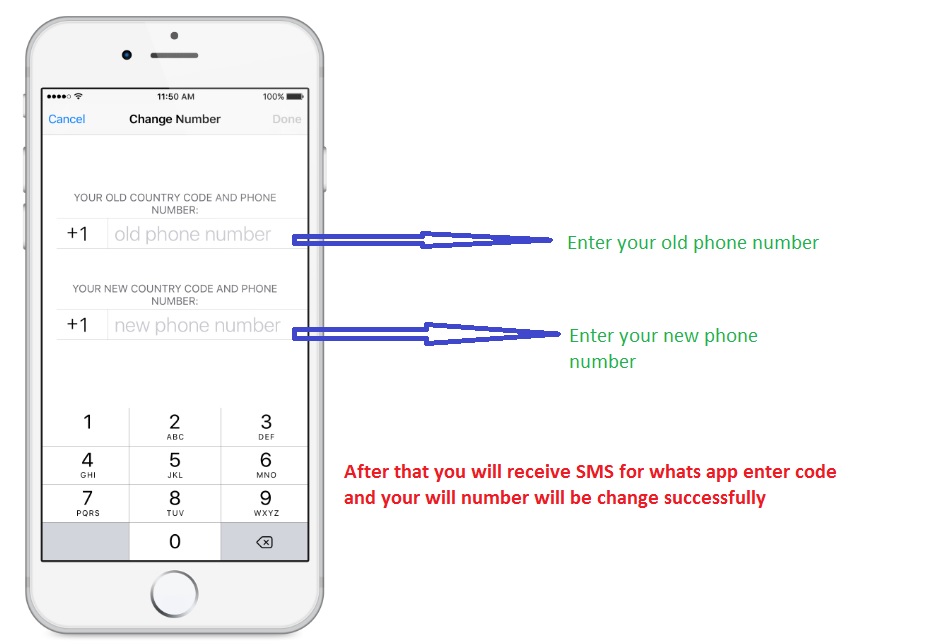 fig. Process to change mobile number in iPhone.
- Tap Setting
- Then tap account
- Then tap on change number as shown in figure
- Enter your old phone number in top box
- Enter your new phone number in bottom box
- Enter Code sent by whats app team in your new mobile number
- Tap Done
-
Window Phone
-
-
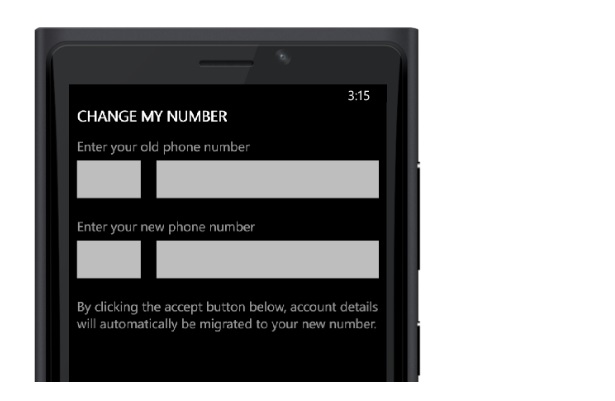 fig. Process to change mobile number in Window Phone
- Open WhatsApp
- Tap More...
- Tap setting > account > change my number > continue
- Enter your old phone number in top box
- Enter your new phone number in bottom box
- Tap accept at the bottom of the screen to continue.
- Enter Code sent by whats app team in your new mobile number to verify
- Tap Done
-
Nokia s40
-
-
- Open WhatsApp.
- Go to Options > Settings > Account > Change Phone Number.
- Select Next and simply enter your old number and new number.
- Follow the instructions to verify your new phone number.